Save data in a local database using Room
Apps that handle non-trivial amounts of structured data can benefit greatly from persisting that data locally. The most common use case is to cache relevant pieces of data so that when the device cannot access the network, the user can still browse that content while they are offline.
The Room persistence library provides an abstraction layer over SQLite to allow fluent database access while harnessing the full power of SQLite. In particular, Room provides the following benefits:
- Compile-time verification of SQL queries.
- Convenience annotations that minimize repetitive and error-prone boilerplate code.
- Streamlined database migration paths.
Because of these considerations, we highly recommend that you use Room instead of using the SQLite APIs directly.
Setup
To use Room in your app, add the following dependencies to your app’s build.gradle file:
Groovy
dependencies { def room_version = “2.3.0”
implementation "androidx.room:room-runtime:$room_version"
annotationProcessor "androidx.room:room-compiler:$room_version"

// optional - RxJava2 support for Room
implementation "androidx.room:room-rxjava2:$room_version"

// optional - RxJava3 support for Room
implementation "androidx.room:room-rxjava3:$room_version"

// optional - Guava support for Room, including Optional and ListenableFuture
implementation "androidx.room:room-guava:$room_version"

// optional - Test helpers
testImplementation "androidx.room:room-testing:$room_version"

// optional - Paging 3 Integration
implementation "androidx.room:room-paging:2.4.0-beta01" }
Primary components
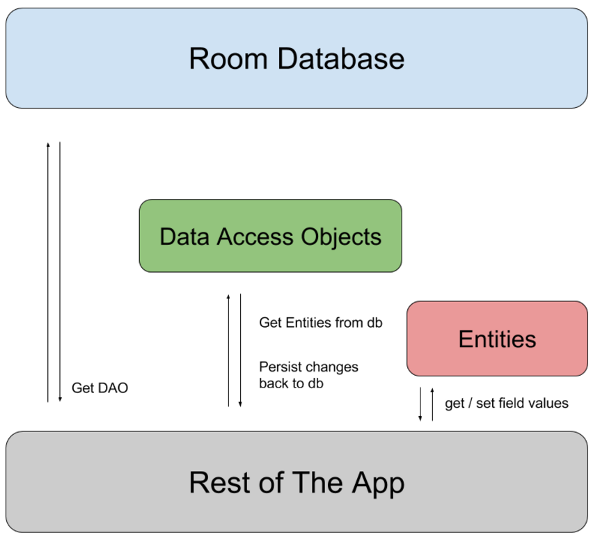
There are three major components in Room:
The database class that holds the database and serves as the main access point for the underlying connection to your app’s persisted data.
Data entities that represent tables in your app’s database. Data access objects (DAOs) that provide methods that your app can use to query, update, insert, and delete data in the database.
Defining data using Room entities
When you use the Room persistence library to store your app’s data, you define entities to represent the objects that you want to store. Each entity corresponds to a table in the associated Room database, and each instance of an entity represents a row of data in the corresponding table.
Anatomy of an entity
You define each Room entity as a class that is annotated with @Entity. A Room entity includes fields for each column in the corresponding table in the database, including one or more columns that comprise the primary key.
The following code is an example of a simple entity that defines a User table with columns for ID, first name, and last name:
Java
@Entity public class User { @PrimaryKey public int id;
public String firstName;
public String lastName; }