Intents, Activities, and SharedPreferences
Understand Tasks and Back Stack
-
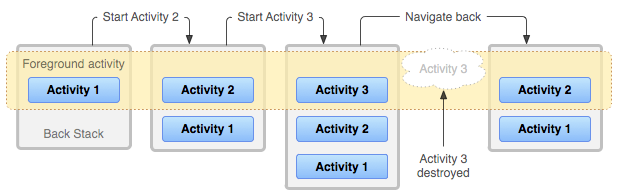
he activities are arranged in a stack—the back stack—in the order in which each activity is opened. If the user presses the Back button, that new activity is finished and popped off the stack.
-
When the user touches an icon in the app launcher, If no task exists for the app, then a new task is created and the “main” activity for that app opens as the root activity in the stack.
-
When the current activity starts another, the new activity is pushed on the top of the stack and takes focus. When the user presses the Back button, the current activity is popped from the top of the stack and the previous activity resumes.
-
While in the background, all the activities in the task are stopped, but the back stack for the task remains intact. A task can then return to the “foreground” so users can pick up where they left off.
-
one activity in your app might be instantiated multiple times. As such, if the user navigates backward using the Back button, each instance of the activity is revealed in the order they were opened. you can modify this behavior if you do not want an activity to be instantiated more than once.
Lifecycle recap
To summarize the default behavior for activities and tasks:
-
When Activity A starts Activity B, Activity A is stopped, but the system retains its state (such as scroll position and text entered into forms). If the user uses the Back or gesture while in Activity B, Activity A resumes with its state restored.
-
When the user leaves a task using the Home button or gesture, the current activity is stopped and its task goes into the background. The system retains the state of every activity in the task. If the user later resumes the task by selecting the launcher icon that began the task, the task comes to the foreground and resumes the activity at the top of the stack.
-
If the user presses or gestures Back, the current activity is popped from the stack and destroyed. The previous activity in the stack is resumed. When an activity is destroyed, the system does not retain the activity’s state. This behavior is different for root launcher activities when your app is running on a device that runs Android 12 or higher.
-
Activities can be instantiated multiple times, even from other tasks.
Managing Tasks
Using when you decide to interrupt the normal behavior of Back Stack.
Caution: Most apps should not interrupt the default behavior for activities and tasks.
[Defining launch modes]
Launch modes allow you to define how a new instance of an activity is associated with the current task. You can define different launch modes in two ways:
- Using the manifest file.
- Using Intent flags.
[Using the manifest file]
When declaring an activity in your manifest file, you can specify how the activity should associate with a task using the
- “standard”.
- “singleTop”.
- “singleTask”.
- “singleInstance”.
[Using Intent flags]
When starting an activity, you can modify the default association of an activity to its task by including flags in the intent that you deliver to startActivity(). The flags you can use to modify the default behavior are:
- FLAG_ACTIVITY_NEW_TASK.
- FLAG_ACTIVITY_SINGLE_TOP.
- FLAG_ACTIVITY_CLEAR_TOP.
Note: If the launch mode of the designated activity is “standard”, it too is removed from the stack and a new instance is launched in its place to handle the incoming intent.
[Handling affinities]
You can modify the affinity for any given activity with the taskAffinity attribute of the < activity> element.
The taskAffinity attribute takes a string value, which must be unique from the default package name declared in the < manifest> element, because the system uses that name to identify the default task affinity for the app.
[Clearing the back stack]
If the user leaves a task for a long time, the system clears the task of all activities except the root activity. When the user returns to the task again, only the root activity is restored. There are some activity attributes that you can use to modify this behavior:
- alwaysRetainTaskState.
- clearTaskOnLaunch.
- finishOnTaskLaunch.